INTRODUCTION: THE LMS LANDSCAPE IN 2026
The workplace is changing faster than ever. According to the World Economic Forum, 44% of workplace skills will be disrupted in the next five years. Yet 21% of businesses cite addressing skills gaps as their top priority, and most lack a structured way to deliver training at scale.
Enter the Learning Management System (LMS).
In 2026, more than 700 LMS vendors compete for market share, and the global LMS market has grown to approximately $20 billion annually, with projected growth to $30 billion by 2030. Organizations across every industry, from healthcare to retail, finance to manufacturing, rely on LMS platforms to onboard employees, ensure compliance, upskill teams, and stay competitive.
But not all LMS solutions are created equal. The choice between cloud-based SaaS, self-hosted, or open-source can mean the difference between a $50,000 annual investment and a $500,000+ implementation. Feature richness and security features matter, but so do change management, organizational readiness, and alignment with your business outcomes
This guide cuts through the noise. Whether you’re evaluating your first LMS or replacing a legacy system, you’ll learn what matters, how to evaluate vendors, what to expect during implementation, and how to measure ROI. By the end, you’ll have a realistic roadmap for transforming learning in your organization.
WHAT IS AN LMS? DEFINITION, ARCHITECTURE & EVOLUTION
Beyond “Training Software”
An LMS is a software platform designed to create, deliver, manage, and track educational courses and training programs. But that definition undersells what modern LMS platforms actually do.
Think of an LMS as a three-layer stack:
- Content Layer: Tools to create, store, and organize learning materials (courses, videos, PDFs, quizzes, simulations)
- Delivery Layer: User-friendly interfaces where learners access courses, track progress, and complete assignments
- Intelligence Layer: AI-powered analytics that recommend courses, personalize learning paths, and measure ROI
The best LMS platforms integrate these seamlessly so that organizations can launch training programs, track compliance, measure business impact, and adapt in real-time based on learner behavior and organizational needs.
LMS Evolution: From 1990s to 2026
- 1990s–2000s: Simple course repositories; basic course delivery, minimal tracking.
- 2000s–2010s: Feature multiplication; mobile access emerges; social learning tools added.
- 2010s–2020s: Cloud dominance; AI and personalization begin; microlearning gains traction.
- 2020–2026: AI-driven recommendations; integration-first architecture; “learning in the flow of work” becomes a priority; skills-based learning integrated with career pathing; mobile-first design becomes standard; immersive learning (VR/AR) enters the early adoption phase.
LMS vs. LXP vs. LCMS: The Confusing Alphabet
- LMS (Learning Management System): Structured, compliance-focused, and instructor/admin-driven. Manages “who takes what, and when.” Best for formal training, mandatory compliance, and structured onboarding.
- LXP (Learning Experience Platform): Learner-driven, personalized, and discovery-first. Curates content from multiple sources, allowing users to explore at their own pace. Best for self-directed learning, continuous upskilling, and employee engagement.
- LCMS (Learning Content Management System): A content authoring tool for creating courses. Often paired with an LMS for content delivery. Best for organizations with in-house instructional design teams creating custom learning content.
Modern platforms increasingly blur these distinctions. Leading vendors now combine LMS and LXP capabilities into a single solution. Choose based on your primary use case:
- Formal compliance training: LMS
- Self-directed learning: LXP
- Content creation: LCMS

3. WHY ORGANIZATIONS NEED AN LMS: CORE BUSINESS DRIVERS
Organizations invest in LMS platforms to address five primary business challenges:
- Regulatory & Compliance Risk: Mandatory training (HIPAA, FINRA, OSHA), audit trails, certification tracking, and regulatory fine avoidance.
- Talent Retention & Development: Career pathing, upskilling, professional development opportunities, and visible internal promotion pathways reduce turnover by 5-15%.
- Operational Efficiency: Onboarding (reduce ramp time by 30%), training at scale, reduced instructor travel, lower per-employee training cost.
- Revenue Growth: Sales enablement (faster ramp, higher quota attainment), customer education (product adoption, support cost reduction), partner enablement.
- Competitive Agility: Rapid workforce reskilling for new tools/methodologies, faster response to market changes, reduced external hiring costs.
Organizations typically prioritize these in order: compliance → efficiency → retention → revenue → agility. Your LMS vendor selection should reflect your primary business driver.
THE BUSINESS CASE: LMS ROI, COST-BENEFIT & FINANCIAL MODELS
Total Cost of Ownership (TCO) Framework
Implementation & Setup (Year 1):
- Software licensing: $50k-$300k (depending on organization size and deployment model)
- Implementation services: $50k-$200k
- Data migration & system integration: $25k-$100k
- Change management & training: $20k-$75k
Ongoing Operational Costs (Annual):
- Software licensing: $30k-$250k/year
- IT support & administration: $20k-$75k/year
- Content creation & updates: $25k-$100k/year
ROI by Use Case
Onboarding ROI Example:
- 500 new hires/year × 4 weeks saved × $3k/week cost = $6M benefit/year
- Minus LMS cost ($150k) = $5.85M net benefit Year 1
- Payback: 1 month
Compliance Training ROI Example:
- 1,000 employees × 8 hours compliance training today × $100/hour = $800k cost
- LMS reduces time 40% via microlearning = $320k saved
- Regulatory fine avoidance premium = $100k+ value
- Payback: 3-6 months
Sales Enablement ROI Example:
- 50 sales reps × $200k quota × 2% win rate improvement = $200k revenue lift
- Faster 25-day sales cycle (vs. 30 days) = $100k+ cash flow benefit
- Payback: 8-15 months
Customer Education ROI Example (Often Overlooked, High Impact):
- 5,000 customers × 30% support ticket reduction = 1,500 tickets saved × $75/ticket = $112.5k/year
- Product adoption increases 15% (upsell/renewal retention) = $250k-$500k revenue impact
- Implementation cost: $80k (custom paths, content)
- Payback: 3-5 months
- 3-Year ROI: 400%+
Why Customer Education is Underrated:
Most organizations focus LMS ROI on internal training (onboarding, compliance). But customer education often delivers the highest payback because it directly impacts product adoption, NPS, churn reduction, and incremental revenue. Companies like Slack, Salesforce, and Adobe invest heavily in customer training platforms precisely because the ROI is measurable and immediate.
Typical Benchmarks:
- SMB (100-500 employees): Break-even in 9-15 months; 3-year ROI 150-250%
- Mid-market (500-5k): Break-even in 8-12 months; 3-year ROI 200-350%
- Enterprise (5k+): Break-even in 12-18 months; 3-year ROI 250-400%
- Customer Education Programs: Break-even in 3-5 months; 3-year ROI 300-500%
TYPES OF LMS: CHOOSING YOUR DEPLOYMENT MODEL
Cloud-Based (SaaS)
Advantages: Low upfront cost, fast deployment (weeks), automatic updates, global accessibility, vendor support included.
Disadvantages: Limited customization, data sovereignty concerns, vendor lock-in, ongoing licensing costs.
Best for: SMBs, mid-market, fast deployment critical, limited IT resources.
Cost: $5-15/user/month; total platform costs $50k-$500k/year.
Examples: Docebo, Paradiso LMS, TalentLMS, Adobe Learning Manager, Cornerstone OnDemand, Workday Learning.
Self-Hosted
Advantages: Full control, data sovereignty, perpetual licensing options, deep customization.
Disadvantages: High upfront cost, slow deployment (3-6 months), ongoing IT burden, maintenance complexity.
Best for: Large enterprises, strict data residency (HIPAA/GDPR), significant legacy system integrations.
Cost: $100k-$1M license + $150k-$500k implementation + $50k-$200k/year support.
Examples: Canvas (self-hosted option), Desire2Learn, Blackboard.
Open-Source
Advantages: Zero licensing cost, full customization, community support, independence.
Disadvantages: Implementation complexity, requires developer expertise, slower feature development, limited professional support.
Best for: Educational institutions, organizations with IT resources, cost-sensitive operations.
Cost: $0 software + $100k-$300k implementation + $50k-$150k/year ongoing support.
Examples: Moodle (67% of open-source market share), Canvas Open Source, Opigno.
Quick Decision Matrix
| Factor | Cloud SaaS | Self-Hosted | Open-Source |
|---|---|---|---|
| Upfront Cost | Low ($50k-$150k) | High ($300k+) | Minimal ($0) |
| Deployment Speed | Fast (4-8 weeks) | Slow (3-6 months) | Medium (2-4 months) |
| Customization | Limited | High | Unlimited |
| Data Control | Shared | Full | Full |
| Scalability | Unlimited | Moderate | Moderate |
| IT Burden | Low | High | High |
| 5-Year TCO (1k users) | $300k-$500k | $400k-$1M | $300k-$800k |
| Best For | SMB, speed | Enterprise, control | Education, cost |
LMS FEATURES: WHAT TO LOOK FOR & WHY IT MATTERS
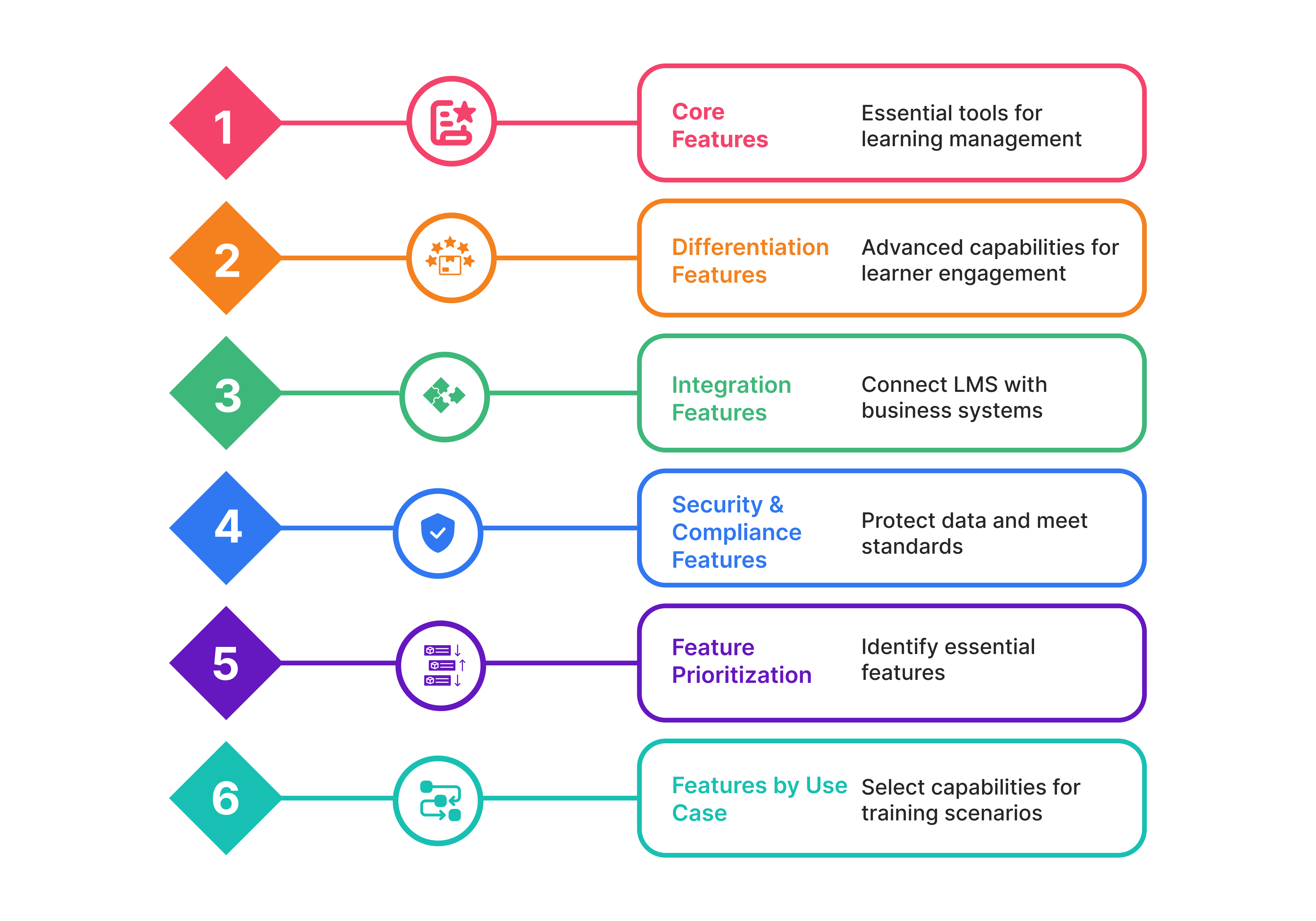
Core Learning Features (Non-Negotiable)
Course Management & Authoring: Ability to create or import courses; template libraries; SCORM/xAPI compliance for reusing existing content.
Content Delivery: Intuitive course catalog with search and recommendations; learning paths that sequence courses by role or skill; progress tracking and resume capability.
Assessments & Quizzes: Question types (multiple choice, essay, simulation); randomization; proctoring (AI or human); passing scores and retake policies.
Tracking & Reporting: Real-time dashboards for admins, managers, and learners; customizable reports; compliance audit trails; certification tracking.
User Management: Single Sign-On (SSO) with HRIS (Active Directory, Azure, Okta); bulk user import; role-based access control; manager/learner hierarchies.
Differentiation Features
Mobile-First Design: Responsive web + native mobile apps; offline access; push notifications; mobile-optimized authoring.
AI-Powered Personalization: Machine learning recommends courses based on learner behavior; identifies skill gaps; creates personalized learning paths. (Feature maturity: 40%+ of enterprise platforms now have functional AI.)
Social Learning & Communities: Discussion forums; peer-to-peer knowledge sharing; moderated communities; social recognition (badges, likes).
Gamification: Points, badges, leaderboards, progress visualization, proven to increase engagement 20-30%.
Live & Virtual Learning: Video conferencing integration (Zoom, Teams, Webex); interactive whiteboard; breakout rooms; recording and replay.
Skills-Based Learning: Skills taxonomy; skill gap analysis; career pathing; progression integrated with learning paths.
Integration & Compliance Features
APIs & Webhooks: REST APIs for custom integrations; real-time webhooks for system-to-system communication.
Pre-Built Connectors & Integration Examples:
- HR/HRIS: Workday, SAP SuccessFactors, ADP, Azure AD, Okta (auto-sync users, org chart)
- Sales/CRM: Salesforce (embed learning in records), HubSpot (training workflows), Pipedrive
- Communication: Slack (in-app learning nudges), Microsoft Teams (virtual classroom, LMS integration)
- Analytics: Google Analytics (track LMS traffic), Tableau, Power BI, Looker
- e-Commerce: Stripe, PayPal, Zuora (customer training monetization)
- Chat/Support: Intercom (in-app learning from support), Zendesk (knowledge base linkage)
Data Security & Compliance (Non-Negotiable):
- Encryption: AES-256 at rest; TLS 1.2+ in transit
- Authentication: SSO (SAML 2.0, OAuth 2.0); Multi-Factor Authentication (MFA); passwordless options
- Standards Compliance: SOC 2 Type II, ISO 27001, GDPR Data Processing Agreement (DPA), HIPAA Business Associate Agreement (BAA), COPPA (if student data)
- Audit Trail: Immutable logs of all user/admin actions; 7+ years retention; legal hold capabilities
- Data Residency: EU/US/Asia data center options; can be selected at contract
Feature Prioritization & Red Flags
Must-Have vs. Nice-to-Have Matrix:
| Criticality | Feature Examples | Action |
|---|---|---|
| Must-Have | SCORM/xAPI compliance, SSO, real-time reporting, GDPR compliance, user management, mobile access | Disqualify vendors lacking these |
| High Priority | AI personalization, social learning, assessment tools, integrations with your HRIS | Weight 40-50% in scoring |
| Medium Priority | Gamification, community tools, advanced customization, white-labeling | Weight 20-30% in scoring |
| Nice-to-Have | Advanced VR/AR, learning analytics AI, immersive simulations | Monitor; may adopt Year 2-3 |
Feature Prioritization by Use Case:
| Use Case | Must-Have Features | High Priority | Nice-to-Have |
|---|---|---|---|
| Employee Onboarding | HRIS sync, user management, SSO, progress tracking, role-based paths | Manager dashboards, mobile, multimedia | Gamification, social, AI personalization |
| Compliance Training | Audit trails, certification tracking, immutable logs, proctoring, pass/fail | Real-time reporting, user segmentation, SCORM | Skills taxonomy, content versioning |
| Sales Enablement | Content versioning, mobile app, performance tracking, role-based access | Sales dashboards, integration with CRM, microlearning | A/B testing, adaptive content, social |
| Customer Education | e-Commerce, multi-portal, white-label, SSO, analytics, mobile | Content library, integrations (Salesforce, Help Center), certifications | Community features, personalized paths, gamification |
Red Flags to Watch:
- “API-first” without usable endpoints: Check sample API docs; request a technical sandbox. “API-first” marketing doesn’t guarantee integration ease. Ask: “What’s your API response time?” and “Can you show us a HRIS sync setup?”
- Unlimited customization + vague timelines: If vendor promises deep customization but can’t commit to timeline, expect delays (6-12 months vs. 4-8 weeks). Clarify: what’s out-of-box vs. custom-build? Get a statement of work (SOW).
- Low mobile adoption in demos: Ask: “What % of your users access via mobile?” If <30%, mobile experience is an afterthought. Check reviews on mobile UX (App Store ratings <4/5 is a red flag).
- Weak change management resources: Vendor provides LMS, but you provide change leadership. If vendor has no templates, playbooks, or change resources, implementation will stumble. Ask: “Do you have a change management toolkit?” and “Can we talk to a customer’s change lead?”
- Customization vs. SaaS trade-off confusion: SaaS = limited customization. If you need 50+ custom fields or UI changes, self-hosted or open-source is more appropriate (and more expensive). Don’t expect SaaS to behave like self-hosted.
- Limited reporting/analytics: Ask for a live demo of custom reporting. Can you filter by department? By course? By learner attribute? Can you export? Poor reporting = poor ROI visibility.
- No security certifications: If vendor can’t show SOC 2, ISO 27001, or GDPR DPA, compliance risk is high. Ask: “When was your last SOC 2 audit?” (Should be <12 months.)
EVALUATING & SELECTING AN LMS: THE STREAMLINED PROCESS
Step 1: Define Requirements & Research Vendors
Define Success:
- Outcome-based: “We need to reduce onboarding time by 30%, achieve 100% compliance audit readiness, and support 10,000 remote learners.”
- Non-negotiables: Cloud-based SaaS? GDPR-compliant? SCORM integration required? Specific integrations (Workday, Salesforce)?
- Budget & timeline: $X-Y per year; deployment by [date].
- Output: One-page success statement; requirements matrix (feature/importance/rationale).
Research Vendors:
- Where to start: Gartner Magic Quadrant (analyst credibility); G2 and Capterra (peer reviews); industry peers (LinkedIn, ATD conferences).
- Shortlist criteria: Must-have requirements met; price within budget; deployment timeline achievable; relevant case studies in your industry.
- Final shortlist: 3-5 vendors (typical range after filtering 20-30 initial options).
Step 2: Evaluate, Demo & Score
Build an Evaluation Scorecard:
| Criteria | Weight | Details |
|---|---|---|
| Product Fit | 40% | Must-have features, use case coverage, UX quality, mobile, integrations, customization |
| Implementation | 30% | Timeline feasibility, support quality, training resources, reference quality |
| Vendor Viability | 20% | Financial health, roadmap alignment, market position, partnerships |
| Cost | 10% | Total 3-year cost, pricing flexibility, contract terms |
Score each vendor 1-10 on criteria; weight by importance.
The Demo Checklist:
- Request hands-on, use-case-specific demos (not generic walkthroughs)
- Ask: “How long did that setup take?” “Can we customize branding?” “What happens at 100k users?” “Show us HRIS sync in action.”
- Test mobile experience; check dashboard customization; verify SSO setup.
- Run a hypothetical scenario: “Walk me through compliance training rollout for 1k employees.”
Reference Calls (2-3 customers):
- Similar company size/industry
- Using similar features (your priority use cases)
- Ask: “Did implementation go on time/budget?” “How responsive is support?” “Would you recommend them?” “What surprised you?”
- Listen for unscripted feedback; ask about pain points (e.g., “What do you wish you’d known?”)
Step 3: Pilot & Decide
- Scope: 500-1,000 users; 4-8 weeks; single use case (e.g., onboarding)
- Success criteria: 80%+ adoption, 4.5+ NPS, zero critical bugs, compliance needs met
- Decision gateway: Go (extend to full org) / Go with modifications / Pivot (choose different vendor)
- Typical outcome: 70-80% of pilots go forward; 20% require either modifications or vendor switch.
Vendor Selection Negotiation Tips
Pricing Models vary:
- Per-user/month: $5-15/user/month (volume discounts available)
- Platform + per-user: $100k platform + $5/user
- Subscription: Fixed annual cost ($150k-$500k)
- Perpetual license: One-time cost + annual support (20-30% of license)
Negotiate tactics:
- Get competing quotes (leverage competitor pricing)
- Ask for volume discounts (e.g., “We’re budgeting for 1,000 users; what’s your volume discount?”)
- Negotiate term length (multi-year discounts; negotiate price caps for Year 2-3)
- Bundle services (implementation + training for discount)
- Ask about pilot discounts (many vendors waive or reduce pilot costs)
Contract red flags:
- Auto-renewal without manual override (negotiate 60-day opt-out)
- Unreasonable price escalation (3-5% annually is normal; 10%+ is not)
- Weak SLAs (uptime, support response time)
- Data portability restrictions (ensure you can export your data)
- Perpetual lock-in (negotiate exit clauses)
H2 7.5 LMS VENDOR LANDSCAPE: WHO TO EVALUATE
Here are 8-10 leading platforms by category. This list reflects market presence, feature maturity, and customer base as of June 2026.
Enterprise (5k+ users, complex needs, high customization)
Paradiso LMS
Best for: Large enterprises requiring flexibility across employee training, customer education, partner enablement, compliance, and global learning initiatives.
Positioning: Enterprise-grade, AI-powered LMS supporting multi-tenant deployments, extended enterprise learning, white-labeling, advanced integrations, and personalized learning experiences.
Key strength: Highly flexible enterprise platform with multilingual support, extensive integration capabilities, AI-powered features, multi-tenant architecture, and support for employees, customers, partners, and franchise training from a single platform.
Docebo
Best for: Scalability, AI-driven personalization, extended enterprise (customers + partners)
Positioning: Enterprise-grade LMS + LXP hybrid; AI-powered learning intelligence; strong social learning
Key strength: Global scalability (30M+ users); community/social features; e-commerce built-in
Cornerstone OnDemand
Best for: Large enterprises, compliance-heavy industries (finance, healthcare)
Positioning: Comprehensive talent development platform; strong in succession planning + skills
Key strength: Integrated talent management (recruitment, performance, learning); strong reporting
Workday Learning (Part of Workday HCM)
Best for: Enterprises already using Workday HCM
Positioning: Tightly integrated with Workday; minimal separate LMS admin needed
Key strength: Seamless HRIS sync (no data mapping); unified employee lifecycle
Adobe Learning Manager
Best for: Creative industries, organizations using Adobe Creative Cloud
Positioning: AI-powered personalization; microlearning focus; intuitive UI
Key strength: Beautiful, intuitive interface; strong learning paths; gamification
Mid-Market (500-5k users, balance of features & cost)
TalentLMS
Best for: SMBs to mid-market, companies needing fast, affordable deployment
Positioning: Cloud-first, user-friendly, affordable; strong mobile experience
Key strength: Quick setup (weeks not months); responsive support; cost-effective
Absorb LMS
Best for: Mid-market wanting customization without complexity
Positioning: Customizable but not overwhelming; good for hybrid internal/external training
Key strength: White-label options; e-commerce; strong customer support; flexible integrations
Litmos (SAP)
Best for: Organizations in SAP ecosystem or needing enterprise-grade features at mid-market price
Positioning: Feature-rich but accessible; mobile-first design
Key strength: Mobile apps (iOS/Android); strong analytics; integrations with SAP, Salesforce, Workday
Education & Open-Source (K-12, Higher Ed, Cost-Conscious)
Canvas LMS (Instructure)
Best for: K-12 schools, colleges, universities; also used for corporate training
Positioning: Open API; strong in education; mobile-responsive
Key strength: Strong education features (gradebook, assignments, discussion); active community; flexible deployment
Moodle (Open-Source)
Best for: Educational institutions, cost-conscious organizations with IT resources
Positioning: Free, fully open-source; 67% of open-source LMS market
Key strength: Highly customizable; community-driven development; no vendor lock-in
Customer Education Specialists
Skilljar
Best for: Companies prioritizing customer onboarding, partner training, customer education revenue
Positioning: Purpose-built for external learners; strong e-commerce; customer-first design
Key strength: Multi-portal support; built-in e-commerce; partner enablement features; community tools; advanced analytics for revenue tracking
IMPLEMENTATION ROADMAP: FROM SELECTION TO VALUE REALIZATION
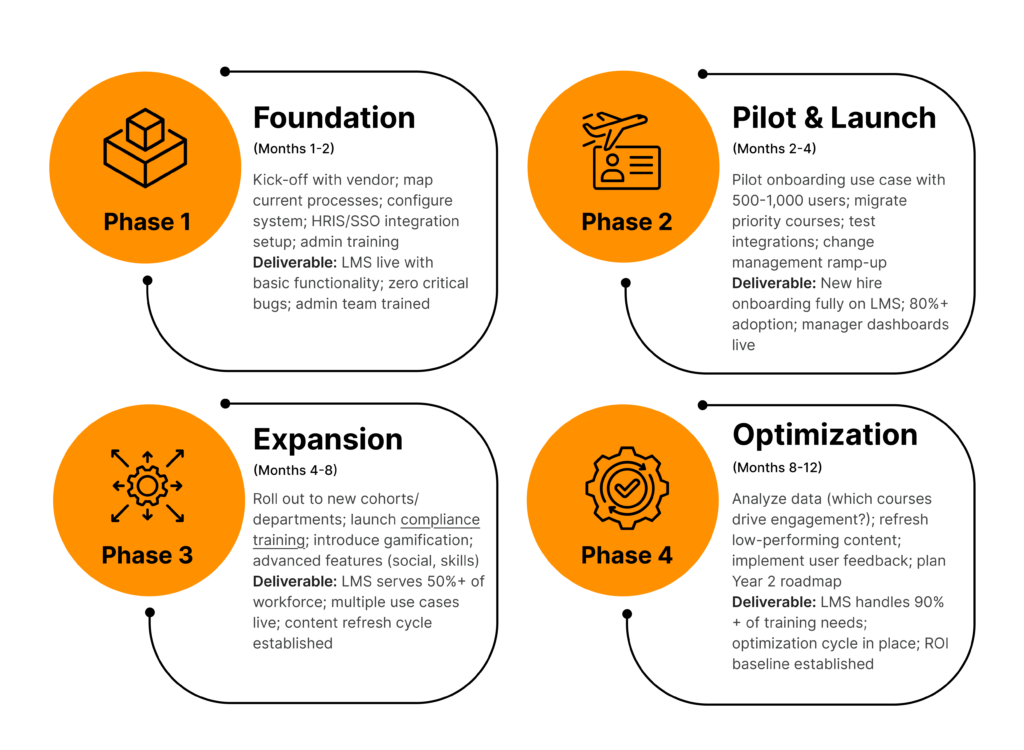
Phase 1: Foundation (Months 1-2)
Kick-off with vendor; map current processes; configure system; HRIS/SSO integration setup; admin training
Deliverable: LMS live with basic functionality; zero critical bugs; admin team trained
Phase 2: Pilot & Launch (Months 2-4)
Pilot onboarding use case with 500-1,000 users; migrate priority courses; test integrations; change management ramp-up
Deliverable: New hire onboarding fully on LMS; 80%+ adoption; manager dashboards live
Phase 3: Expansion (Months 4-8)
Roll out to new cohorts/departments; launch compliance training; introduce gamification; advanced features (social, skills)
Deliverable: LMS serves 50%+ of workforce; multiple use cases live; content refresh cycle established
Phase 4: Optimization (Months 8-12)
Analyze data (which courses drive engagement?); refresh low-performing content; implement user feedback; plan Year 2 roadmap
Deliverable: LMS handles 90%+ of training needs; optimization cycle in place; ROI baseline established
Change Management: The Critical Success Factor
Why It Matters: Technology is 30% of LMS success; change leadership is 70%.
Stakeholder Segmentation:
- Executive Sponsors (5%): C-level alignment; funding; public commitment to LMS culture
- Early Adopters (10%): Champions; super-users; evangelists; create buzz
- Early Majority (35%): Follow adopters if they see ROI and peer adoption
- Late Majority (35%): Skeptical; need support, proof points, and peer pressure to adopt
- Laggards (15%): Resist change; focus communications on compliance/mandatory training
Change Activities:
- Pre-launch: Executive email from sponsor; vision video; success story collection
- Launch: Weekly “Tip of the Week” emails; manager coaching; office hours; leaderboard recognition
- Ongoing: Success stories; peer recognition; monthly adoption metrics shared with leadership
Support Structure (Multi-Tiered):
- Tier 1: Email helpdesk, FAQ, knowledge base, chatbot (response time <4 hours)
- Tier 2: LMS admin, internal trainer, super-user network (response time <24 hours)
- Tier 3: Vendor support (escalation), implementation partner (response time <8 hours for critical issues)
Content Migration Strategy: Audit, Migrate, Retire, Rebuild
Before launch, conduct a content audit and decide the fate of each course:
| Category | Decision | Timeline |
|---|---|---|
| High-Value, Recent | Migrate as-is (convert to SCORM if needed) | Week 1 |
| Outdated Content | Retire (archival only); remove from catalog | Week 1 |
| Partial Value | Extract key modules; rebuild remainder in new LMS | Weeks 2-4 |
| Strategic Gaps | Identify and plan new content creation | Weeks 3-4 |
Typical Outcome: 40-60% migrate, 20-30% retire, 20-40% rebuild/refresh.
Pitfall Prevention:
- Assign a content owner (not IT); clarity on migrate vs. rebuild decisions reduces delays
- Build rebuild timelines into Phase 2-3 roadmap; don’t delay launch waiting for perfect content
- Track which courses perform post-launch; prioritize rebuild based on engagement metrics
Tactical Adoption Playbook (Weeks 1-12)
Week 1-2 (Pre-Launch Awareness):
- Email from exec sponsor: “We’re launching LMS on [date]. Here’s why it matters to you.”
- Vision video (2-3 min): C-level explains business case
- Success story collection: Interview early adopters; capture quotes
Week 3-4 (Manager Enablement):
- Manager coaching sessions: “How to drive team adoption”
- Demo scripts: Give managers talking points for their teams
- Manager dashboards walkthrough: Show them how to monitor team progress
Week 4-8 (Launch & Ongoing):
- Weekly “Tip of the Week” email: Single best practice or feature highlight
- Office hours: Live Q&A with LMS admins (Zoom, 30 min)
- Leaderboard recognition: Department/team completion rates publicly shared (with sensitivity)
- Success stories in newsletter: “Meet Jane from Sales, she completed onboarding 2 weeks early”
Concurrent A/B Testing:
- Content format tests: Measure which learners prefer (self-paced vs. live vs. microlearning)
- Email subject lines: Test “You’re invited to learn…” vs. “New training available”
- Incentive tests: Leaderboards vs. badges vs. certificates; which drives adoption?
- Communication cadence: Weekly emails vs. bi-weekly; which reduces unsubscribes?
Weeks 8-12 (Optimization):
- Monthly metrics review with leadership: Adoption %, completion rates, time-to-value
- Refresh low-performing courses based on learner feedback
- Iterate on messaging: Double down on what’s working; retire underperforming tactics
Common Pitfalls & Prevention
| Pitfall | Prevention |
|---|---|
| Overly ambitious scope | Start with 1-2 use cases; phased rollout; avoid “boil the ocean” approach |
| Weak project governance | Assign exec sponsor; weekly steering committee; change control process |
| Underestimated IT integration | IT partner engaged from day 1; data cleanup upfront; SSO/HRIS testing early |
| Poor content preparation | Content audit upfront; migrate/retire/rebuild decisions made pre-launch |
| Insufficient change management | Invest 20-30% of budget in communications, training, super-users |
| No dedicated admin post-launch | Hire/assign full-time LMS admin before go-live; avoid ad-hoc support |
| Adoption plateau after Month 4 | Continuous engagement (leaderboards, recognition, manager dashboards); monthly metrics |
| Ignoring learner feedback | Conduct surveys (Weeks 2, 6, 12); implement quick wins; show “you listened” |
MEASURING SUCCESS: LMS ANALYTICS & KEY PERFORMANCE INDICATORS
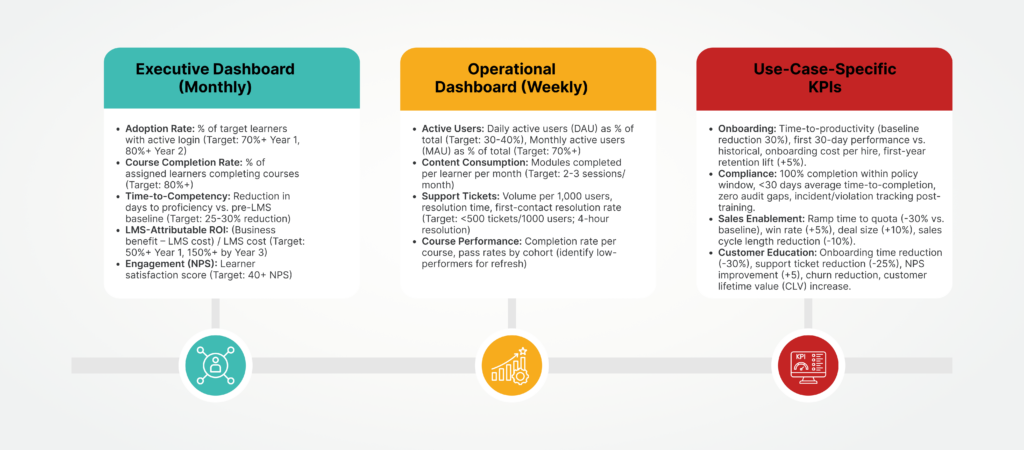
Executive Dashboard (Monthly)
Track these five metrics to demonstrate LMS value to leadership:
- Adoption Rate: % of target learners with active login (Target: 70%+ Year 1, 80%+ Year 2)
- Course Completion Rate: % of assigned learners completing courses (Target: 80%+)
- Time-to-Competency: Reduction in days to proficiency vs. pre-LMS baseline (Target: 25-30% reduction)
- LMS-Attributable ROI: (Business benefit – LMS cost) / LMS cost (Target: 50%+ Year 1, 150%+ by Year 3)
- Engagement (NPS): Learner satisfaction score (Target: 40+ NPS)
Operational Dashboard (Weekly)
Monitor these metrics for course and content optimization:
- Active Users: Daily active users (DAU) as % of total (Target: 30-40%), Monthly active users (MAU) as % of total (Target: 70%+)
- Content Consumption: Modules completed per learner per month (Target: 2-3 sessions/month)
- Support Tickets: Volume per 1,000 users, resolution time, first-contact resolution rate (Target: <500 tickets/1000 users; 4-hour resolution)
- Course Performance: Completion rate per course, pass rates by cohort (identify low-performers for refresh)
Use-Case-Specific KPIs
- Onboarding: Time-to-productivity (baseline reduction 30%), first 30-day performance vs. historical, onboarding cost per hire, first-year retention lift (+5%).
- Compliance: 100% completion within policy window, <30 days average time-to-completion, zero audit gaps, incident/violation tracking post-training.
- Sales Enablement: Ramp time to quota (-30% vs. baseline), win rate (+5%), deal size (+10%), sales cycle length reduction (-10%).
- Customer Education: Onboarding time reduction (-30%), support ticket reduction (-25%), NPS improvement (+5), churn reduction, customer lifetime value (CLV) increase.
LMS Success Stories: Real-World and Representative Examples
Case Study 1: Manufacturing Onboarding (Representative Scenario)
Company: Mid-size manufacturing company (800 employees, 5 facilities)
Challenge:
New-hire onboarding relied on classroom sessions, delaying productivity and creating inconsistent training across multiple locations.
Solution:
Implemented a cloud-based LMS with:
- Pre-hire microlearning
- Role-based onboarding paths
- Blended learning
- Manager dashboards
- Automated progress tracking
Results (Year 1):
- Ramp-to-productivity reduced by 40%
- Instructor workload reduced significantly
- Lower travel and onboarding costs
- Standardized training across all facilities
- Improved first-year employee retention
Business Impact:
Typical payback period of 4–6 months with substantial productivity gains.
Case Study 2: Paradiso LMS Enterprise Training Transformation
Company: CustomerXPs
Challenge:
CustomerXPs needed to modernize employee training, reduce administrative effort, improve learner engagement, and support business growth with a scalable learning platform.
Solution:
Implemented Paradiso LMS with:
- AI-powered personalized learning paths
- Automated enrollments and notifications
- Role-based learning journeys
- Multi-tenant architecture
- Mobile learning
- Multilingual training
- Advanced analytics and reporting
- Enterprise integrations
- Certification and compliance management
Results (Year 1):
- 40% increase in training efficiency
- Reduced administrative workload through automation
- Faster employee onboarding
- Improved learner engagement and course completion
- Centralized reporting with real-time learning analytics
- Scalable platform supporting business expansion
- Consistent learning experiences across distributed teams
Business Impact:
Paradiso LMS enabled CustomerXPs to centralize learning, automate training operations, and improve workforce productivity while creating a scalable foundation for future organizational growth.
Case Study 3: Customer Education with Docebo
Company: PowerDMS
Challenge:
PowerDMS wanted to scale customer onboarding, reduce manual training, and improve product adoption without expanding its customer success team.
Solution:
Implemented Docebo with:
- Self-service customer learning portal
- Learning paths by customer role
- Salesforce integration
- Automated certifications
- Reporting and analytics
Results (Year 1):
- Customer onboarding time reduced by approximately 30%
- Over 5,400 hours of instructor-led training eliminated
- Around $150,000 in annual training cost savings
- Improved customer adoption and engagement
- Reduced reliance on one-to-one onboarding sessions
Business Impact:
The customer education program achieved a documented 119% ROI, enabling PowerDMS to scale customer onboarding while reducing operational costs and improving customer success.
Why These Stories Matter
These three examples demonstrate how modern LMS platforms create measurable business value across different learning initiatives:
Representative onboarding implementations show how organizations can reduce time-to-productivity, standardize training across locations, and accelerate ROI through structured digital onboarding.
Paradiso LMS illustrates how an enterprise learning platform can improve training efficiency, automate administrative processes, support global workforce development, and scale learning through AI-powered personalization, multilingual support, and enterprise integrations.
Docebo’s customer education implementation demonstrates how external training programs can shorten customer onboarding, reduce support costs, improve product adoption, and generate measurable ROI through scalable self-service learning.
The common takeaway: Organizations that align their LMS with broader business objectives, not just course delivery, achieve the greatest long-term value. Whether the goal is employee development, operational efficiency, or customer education, the right LMS becomes a strategic business platform rather than simply a training system.
Key Takeaways
- LMS is infrastructure, not a nice-to-have. It’s essential for compliance, talent development, and competitive agility.
- Cloud SaaS is the norm for good reason. Faster deployment, less IT burden, regular updates, trade-off is limited customization.
- People matter more than platform. Technology is 30% of success; change management, executive sponsorship, and content quality are 70%.
- Avoid vendor lock-in. Ensure data portability, API access, SCORM/xAPI compliance, and contractual exit clauses.
- ROI is achievable and measurable. Onboarding and compliance typically pay for LMS within 6-12 months; expand use cases for additional ROI in Year 2-3.
- Customer education is underrated. Highest ROI (300-500%+) because it directly impacts support costs, product adoption, churn, and revenue.
- Start simple, expand thoughtfully. Launch 1-2 high-value use cases; add advanced features (AI, skills, gamification) over 3 years based on data.
- Measurement drives adoption and ROI. Define success metrics upfront; track KPIs monthly; optimize based on learner behavior data.
- Skills-based learning is the future. By 2028, most enterprises will use LMS to manage skills inventory, career pathing, and learning alignment, not just course delivery.
- Your journey to a modern, strategic LMS starts today. The framework, vendor guidance, implementation roadmap, and KPI methodology in this guide give you the tools to succeed. Now it’s time to act.
CONCLUSION: YOUR LMS ROADMAP STARTS NOW
Selecting the right Learning Management System is no longer just an IT or HR decision – it’s a strategic investment that influences workforce performance, compliance, customer success, and long-term business growth. The best LMS isn’t necessarily the one with the longest feature list; it’s the platform that aligns with your organization’s goals, integrates with your existing technology stack, and can evolve alongside your learning strategy.
Throughout this guide, you’ve explored how to evaluate deployment models, prioritize essential features, calculate ROI, compare leading vendors, plan a successful implementation, and measure results after launch. Whether your objective is employee onboarding, compliance training, sales enablement, partner learning, or customer education, following a structured evaluation process will help you minimize risk and maximize business value.
As AI, skills-based learning, and personalized learning experiences become standard expectations, organizations that invest in the right LMS today will be better positioned to adapt, retain talent, and stay competitive in the years ahead.
Your 90-Day Quick-Start Checklist
- Weeks 1-2: Convene stakeholder team; define success metrics; set budget; assign project lead; secure executive sponsor commitment.
- Weeks 3-4: Review analyst reports (Gartner Magic Quadrant); research vendors on G2/Capterra; build requirements doc; identify non-negotiables.
- Weeks 5-8: Shortlist 3-5 vendors (reference Section 7.5 vendor landscape); request hands-on demos; score on evaluation matrix; conduct reference calls.
- Weeks 9-12: Make vendor selection; negotiate contract; sign; schedule kick-off meeting; create 12-month roadmap; assign implementation team and content owner.
Outcome: Vendor selected, contract signed, implementation begins Month 2; go-live Month 4-5.
FAQs
Q1: What's the difference between an LMS, LXP, and LCMS?
An LMS manages structured training, compliance, onboarding, and learner progress. An LXP focuses on personalized, self-directed learning experiences, while an LCMS is designed for creating and managing learning content. Many modern platforms combine LMS and LXP capabilities to support both formal and continuous learning.
Q2: Is an LMS right for our organization? When do we NOT need one?
Q3: How does an LMS integrate with our HR system?
Most modern LMS platforms integrate with HR systems through APIs to automatically sync employee data, roles, and organizational changes. This eliminates manual administration, keeps training assignments up to date, and ensures employees receive the right learning based on their current role.
Q4: What's the difference between cloud SaaS, self-hosted, and open-source LMS?
Q5: What's a realistic ROI for an LMS?
Q6: We're considering customer education. Is it worth it?
Q7: What features are "must-have" vs. "nice-to-have" in an LMS?
Q8: How long does LMS implementation typically take?
Q9: What's the biggest barrier to LMS adoption?
The biggest challenge is user adoption rather than technology. Organizations can improve adoption by securing executive sponsorship, enabling managers, delivering engaging content, providing ongoing support, and continuously gathering learner feedback.
Q10: How do we measure if our LMS is successful?
Q11: How does an LMS ensure data security and GDPR compliance?
A secure LMS should provide data encryption, Single Sign-On, Multi-Factor Authentication, audit trails, and compliance with standards such as GDPR, SOC 2, ISO 27001, and HIPAA where applicable. Organizations should also verify vendor security certifications and data residency options before implementation.